
Impact is the positive outcome of your improvement work. When you enter an Item's Resolution and answer "Yes" to the Change or No Change question, you specify what Impact you achieved. Doing this helps you communicate the value of your work.
The impacts an organization wants to track can vary, which is why we use Impact Types. Impact Types are unique, customizable outcomes users can report for their work.
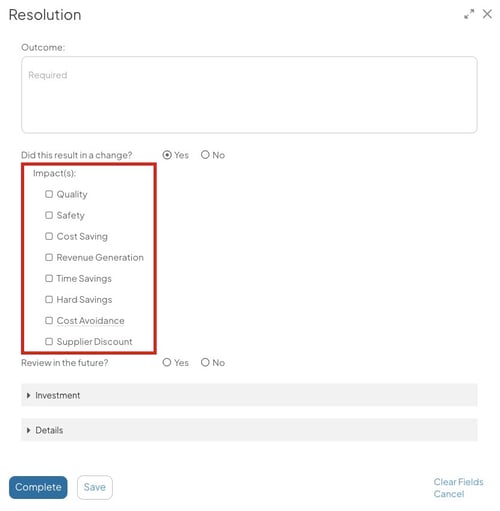
Example of Impact Types in an Item's Resolution.
The name and number of Impact Types will vary depending on your organization. However, each Impact Type will have an Impact Category that determines its key features and functionality.
/Ofie/Ofie%20Profile%20Pic.png?width=50&height=50&name=Ofie%20Profile%20Pic.png) Pro Tip: Contact your Customer Success Manager if you need to create a new Impact Type. Quality Admins can modify certain settings on existing Impacts. See Edit an Impact Type for more information.
Pro Tip: Contact your Customer Success Manager if you need to create a new Impact Type. Quality Admins can modify certain settings on existing Impacts. See Edit an Impact Type for more information.
Impact Categories for Impact Types
Every Impact Type belongs to one of 16 Impact Categories. The category determines the Impact’s functionality and how it is bucketed with other Impacts in reports.
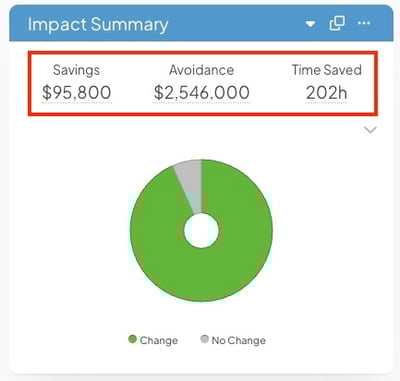
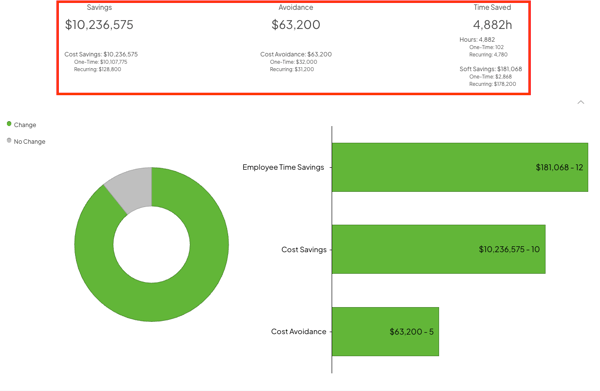
The Impact Summary Report showcases totals for Impact Categories. For example, all Impacts in the Cost Savings category are grouped in the Savings figure.
Impact Types are often named after their category, but they can change to match organization terminology or to distinguish Impact Types when multiple belong to the same category.
The Impact Category determines:
- Whether the Impact is Quantitative or Qualitative
- Whether the Impact uses Impact Values
- Whether the Impact is considered hard or soft savings
- How Impacts are grouped together on Reports
Qualitative Impact Categories
Qualitative Impact Categories allow the person resolving an Item to provide key information about improvements in the following areas:
- Quality
- Safety
- Satisfaction
- Environment
- Health
Qualitative Impacts are used when there is no need to record numerical figures for an Item's outcome. However, depending on the Impact Type's configuration, extra fields may allow users to provide more detail.
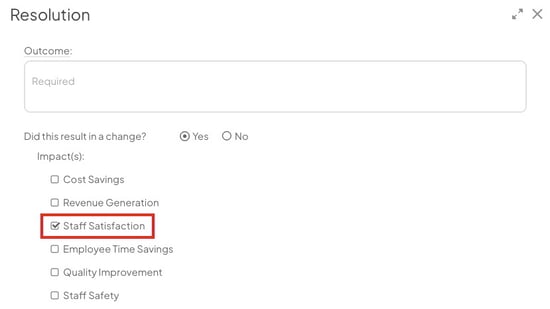
Example of a qualitative Impact Type.
Quantitative Impact Categories
Quantitative Impact Categories let the person resolving an Item enter specific numerical values to define the magnitude of the savings.
There are four quantitative Impact Categories included in the base version of KaiNexus:
- Revenue Generation
- Cost Savings
- Time Savings
- Cost Avoidance
Organizations using the Advanced ROI Module have even more quantitative Impact Types at their disposal:
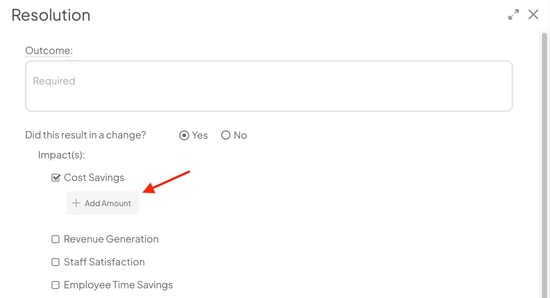
Example of logging a quantitative Impact, which involves adding a specific amount.
/Ofie/Ofie%20Profile%20Pic.png?width=40&height=40&name=Ofie%20Profile%20Pic.png) Pro Tip: Learn more about logging Impact for an Item in the following support pages:
Pro Tip: Learn more about logging Impact for an Item in the following support pages:
Certain Quantitative Impacts have Impact Values
Many quantitative Impacts are measured in currency. However, some are measured using a different kind of unit. For example, Time Savings People are measured in hours.
These Impacts use Impact Values, which help users add more detail when recording certain unit-based Impacts. For example, in Time Savings People, the Impact Values might include roles like engineers, IT staff, or nurses—the specific types of people whose time was saved.
Impact Values let you pinpoint exactly who, what, or which process was affected. You can then assign a monetary rate to each value, making it possible to estimate savings in dollars.
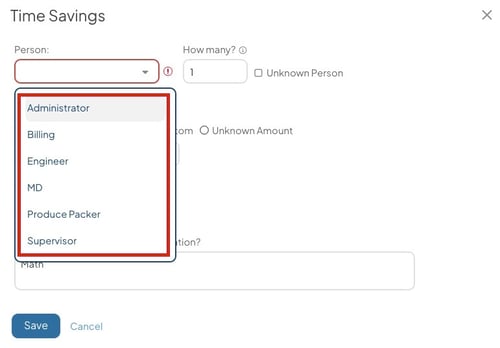
In this example, the "people" represent Impact Values. Users report which role benefited from the improvement and how many individuals in that role were affected. Based on each role's hourly rate, the system calculates a savings value.
Important: You can configure the rate associated with each Impact Value on the administration page corresponding to the category. Learn more on these support pages:
Impact Category affects Impact Reporting
An Impact's category affects how it is grouped together with other data in Reports. There are two key ways categories influence reporting:
Grouping Impact Data in Reports
Impact Types with the same Impact Category are grouped together in report data.
For example, the Impact Summary Report displays totals for various Impact Categories across the top of the Report. If you have multiple Impacts within the Revenue Generation category (such as Tax Credit and Cash Credit), their values will be combined and displayed as a single total under Revenue Generation.
Hard vs. Soft Savings Classification
Impact Category also determines whether an Impact is considered hard savings or soft savings in financial reports.
The following Impact Categories are hard savings:
- Cost Savings
- Revenue Generation
- Cost Avoidance
- Products
- Resources
All other Quantitative Impact Categories are soft savings.
This distinction affects how certain financial data is calculated and displayed in reports: 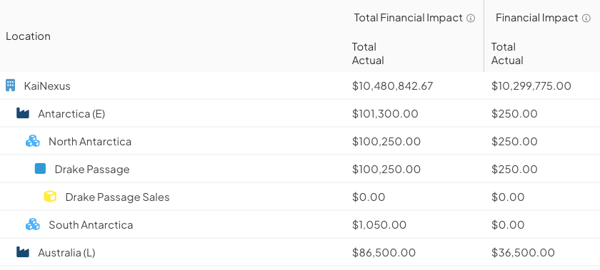
-
Financial Impact: Includes the monetary value of all hard savings Impacts only.
-
Total Financial Impact: Includes the monetary value of all Quantitative Impacts (both hard and soft savings).