
/Ofie/Ofie%20Profile%20Pic.png?width=50&height=50&name=Ofie%20Profile%20Pic.png) Important: The KaiNexus Intelligence Module must be enabled for your organization to use AI Recaps. See KaiNexus Intelligence Module for more information.
Important: The KaiNexus Intelligence Module must be enabled for your organization to use AI Recaps. See KaiNexus Intelligence Module for more information.
What are AI Recaps?
AI Recaps are personalized email summaries of recent activity in KaiNexus. They help you catch up on updates from your Activity Feed and Notifications without needing to log in and review each update individually.
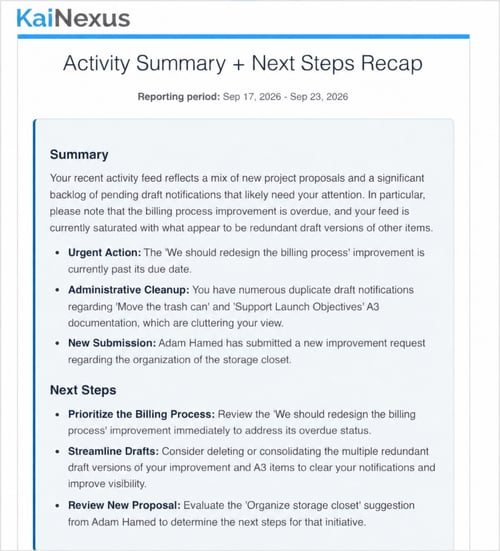
Depending on how your organization configures a Recap, it can summarize recent activity, recommend next steps, or provide other guidance. Recaps can help you keep up with your own work or updates across your team or department, even on days you do not log in to KaiNexus.
What types of AI Recaps are available?
Two Stock Recaps are available at every level of the KaiNexus Intelligence Module. Organizations with Premium KaiNexus Intelligence can also customize Stock Recaps and create Custom Recaps.
| Recap | Description |
|---|---|
| Activity Summary | Summarizes recent activity from your Activity Feed and Notifications to help you catch up on what's changed. |
| Activity Summary + Next Steps | Summarizes recent activity from your Activity Feed and Notifications and recommends next steps. |
| Custom Recap | Uses Activity Feed activity, Notifications, or both, with instructions tailored to your organization's needs. Available with Premium KaiNexus Intelligence. |
If your organization customizes a Stock Recap, its content may differ from the descriptions above.
Who can receive AI Recaps?
Your organization's AI Admins determine who receives each Recap. Recipients can be selected by Location, Role, Persona, or individual user.
When will I receive an AI Recap?
KaiNexus begins preparing your Recap on your selected Recap Days at your specified email delivery time. New users who have not yet customized their Recap Days will receive their organization's default Recap Days. The email is sent after the Recap finishes processing.
Your first Recap can include activity from up to the previous seven days. After that, each Recap includes activity since the end of the reporting period covered by your previous Recap, up to a maximum of seven days.
If there is no applicable activity to summarize for a reporting period, KaiNexus will not send a Recap.
Configure your Recap Days
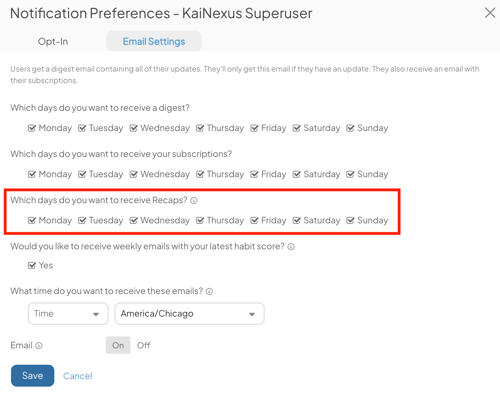
To choose which days you receive AI Recaps:
- Select your profile picture in the Navigation Bar, and select User Profile.
- Select Actions > Notification Preferences in the top right corner of your User Profile.
- Open the Email Settings tab.
- Use Recap Days to select or deselect days of the week. This schedule applies to all your Recaps.
-
Use your email delivery time and time zone selection to choose what time of day you receive Recaps. These settings also apply to your Digest and Subscription emails.
- Select Save.
Pro Tip: If you select no Recap Days, you won't receive scheduled Recaps. You remain a configured recipient and still count toward the Recap's recipient limit.
What's included in an AI Recap?
The content depends on how your organization configures the Recap. A Recap email includes:
- The Recap name and reporting period.
- An AI-generated summary, with recommendations or other guidance when included in the Recap.
- Referenced Items, when applicable, with each cited Item's ID, linked Title, and Status.
- The number of source records used and a notice if some source information could not be included.
- The date the Recap was generated and an AI-generated content disclaimer.
- An Open KaiNexus link.
How does KaiNexus determine what to include?
Each Recap uses recent information from your Activity Feed, Notifications, or both, according to its configuration. KaiNexus combines overlapping information and prioritizes recent activity.
A Recap can use up to 50 combined activity and notification records. Its configured limits may further restrict the amount of information included. If some source information is omitted because those limits are reached, the email includes a notice.
Why didn't I receive an AI Recap?
In addition to your Recap Days and the available activity, delivery depends on these conditions:
- The Recap must be Active and not archived.
- You must still qualify as a recipient.
- Your organization must have AI Credits available.
- You must be included within the Recap's recipient limit. Each Recap supports up to 10 recipients with Base, 50 with Advanced, or 100 with Premium KaiNexus Intelligence. If eligibility or licensing changes cause an Active Recap to exceed its limit, only the first eligible group up to that limit is considered for scheduled delivery.