
System Roles, Team Roles, and Personas all help define a user's experience in KaiNexus, but they serve different purposes.
- System Roles grant permissions across large sets of Items and platform features, and also influence aspects of the user experience such as default Boards and notification preferences.
- Team Roles grant permissions and notifications for individual Items.
- Personas categorize users for filtering, reporting, and Board sharing. Personas do not grant any permissions.
System Roles and Team Roles determine what a user can do in KaiNexus, while Personas help organize groups of users without affecting access.
Understanding the differences between these three concepts is important when configuring permissions, building reports and Boards, sharing content, and troubleshooting user access.
At a Glance
| Feature | System Roles | Team Roles | Personas |
| Grants permissions for large sets of Items | ✓ | ||
| Grants permissions for individual Items | ✓ | ||
| Grants access to platform areas and features | ✓ | ||
| Affects notifications | ✓ | ✓ | |
| Can be used for Board sharing | ✓ | ✓ | |
| Can be used to filter users | ✓ | ✓ | ✓ |
What is a Persona?
A Persona is a way to categorize users in KaiNexus. Unlike System Roles and Team Roles, Personas do not grant permissions or affect notifications.
Instead, Personas are used to group users for organizational purposes, such as:
- Filtering and reporting on specific groups of users
- Sharing Boards with targeted audiences
- Segmenting users based on the type of work they perform
/Ofie/Ofie%20Profile%20Pic.png?width=50&height=50&name=Ofie%20Profile%20Pic.png) Pro Tip: Visit the Personas support page to learn about the types of Personas available.
Pro Tip: Visit the Personas support page to learn about the types of Personas available.
What is a System Role?
A System Role is a collection of permissions that determines what level of access you have in KaiNexus. They are highly customizable, and your organization can have any number of System Roles, each with a unique set of permissions.
System Roles are also a method by which you can assign default Boards and notification preferences to every user with that System Role. Every KaiNexus user should have at least one System Role.
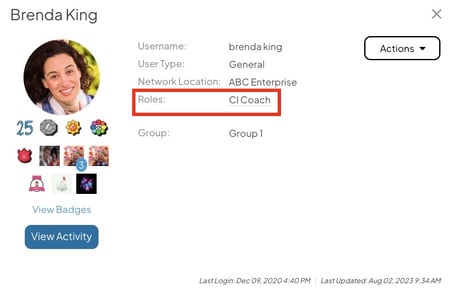
You can view your System Role in your User Profile. Hover over the name of your System Role to read a description.
There are two main categories of permissions that can be granted in a System Role:
- Item permissions give you the ability to interact with Items of specific Templates or Workflows. These permissions can be granted everywhere, in your Location, or in your Location & Below.
- For example, a System Role with Edit Permission Everywhere for Idea Templates grants Users with that System Role the ability to edit all Ideas in the system regardless of whether they are added to the Item Team. Limiting the permission to Location Only or Location & Below would allow Users with the System Role to edit all Ideas that are tagged with their Location or their Location and all the Locations nested beneath it.
- Platform and admin permissions give you access to additional sections of KaiNexus, such as the Items, People, and Reports sections, provide administrative capabilities, and more.
Pro Tip: To learn more about System Roles, check out this article.
What is a Team Role?
Team Roles grant you permissions and give you notifications for an Item. They also describe your scope of responsibility in the Item's improvement work.
Whereas the Template and Workflow Permissions available in a System Role apply to many Items (for example, all Items in the User's Location), Team Role Permissions apply to only one Item at a time.
You are given a Team Role when you are added to the Team of an Item.
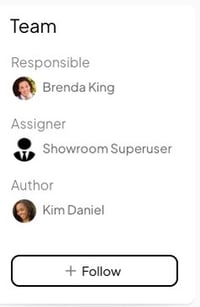
Image of a Team Panel with three Team Roles. Each Team Role confers different permissions and notifications to the person assigned it. For example, being assigned the Responsible Team Role means that you will have the ability to edit the Item regardless of if you have a System Role with edit permissions.
Each Item will have a set of available Team Roles based on the Item's Team Type. Which permissions and notifications you receive for an Item will depend on which Team Role you receive.
/Ofie/OG%20Ofie.png?width=50&height=50&name=OG%20Ofie.png) Pro Tip: You can view which permissions and notifications accompany each Team Role by viewing the tables in our Advanced Team, Standard Team, Simple Team, and Author-Only Team articles.
Pro Tip: You can view which permissions and notifications accompany each Team Role by viewing the tables in our Advanced Team, Standard Team, Simple Team, and Author-Only Team articles.
The following table gives a description of each Team Role that may be available on an Item.
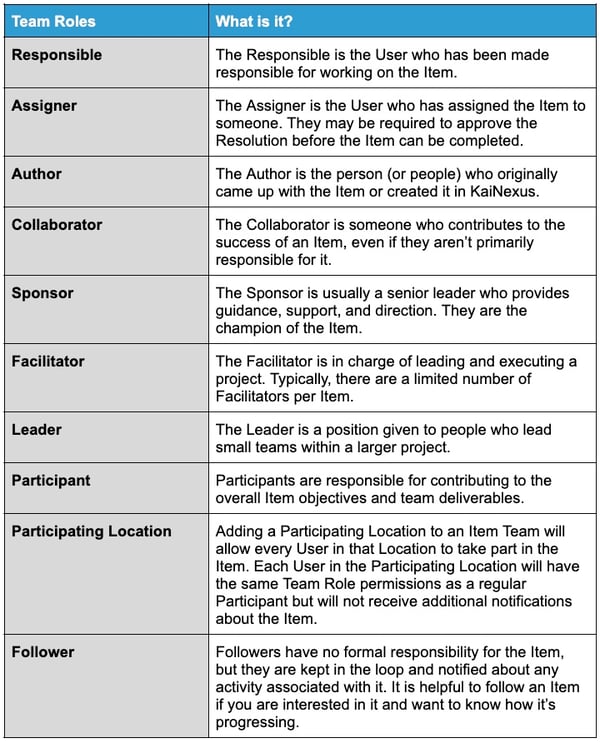
Note: Your organization may utilize Custom Team Roles, which are unique Team Roles not included in the standard sets.
System Roles and Team Roles work together
Your System Roles and Team Roles work together. They add into a superset of permissions of actions you can take in KaiNexus. They don't override each other or cancel out; they work additively.
This means that you can get access to interact with an Item through either your System Role or Team Role. If your System Role does not give you edit access to a particular Item, then you must be granted a Team Role with edit permission to edit it. Conversely, if your System Role Permissions gives you access to edit Items in your Location, then you don't need to be added to the Team of any Items in your Location in order to edit them.
Important: Some actions require you to have certain permissions in your System Role regardless of what Team Role you have on an Item. For example, you must have the Delete Permission included in your System Role to delete an Item, even if you are on the Item Team. However, just having the Delete Permission in your System Role doesn't give you the ability to delete all Items in the System. You must also have permission to edit it through your Team or System Role.
If you have any questions about why you are unable to take a certain action or find unexpected behavior in relation to Team and System Roles, feel free to submit a support ticket.
Recommended Reading
Now that you understand the difference between System Roles and Team Roles, we recommend reading the articles below to further your understanding of permissions in KaiNexus.
- What is a Team?
- System Role Permissions
- System Role Notifications
- Create a System Role
- What are Network Locations?
- Personas