
/Ofie/Ofie%20Profile%20Pic.png?width=50&height=50&name=Ofie%20Profile%20Pic.png) Important: Your organization must have Advanced or Premium KaiNexus Intelligence to use Nudges. Advanced supports Nudges on Stock Item Insights. Premium also supports Nudges on Custom Item Insights. See KaiNexus Intelligence Module for more information.
Important: Your organization must have Advanced or Premium KaiNexus Intelligence to use Nudges. Advanced supports Nudges on Stock Item Insights. Premium also supports Nudges on Custom Item Insights. See KaiNexus Intelligence Module for more information.
Nudges help bring the right Insight to the right person at the right time. Instead of requiring someone to search for or run an Insight themselves, a Nudge can recommend a relevant Insight directly on an Item when specific conditions are met.
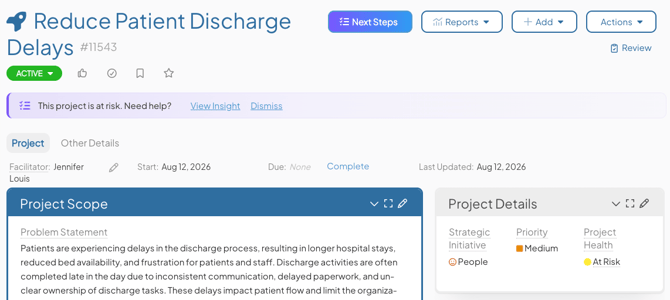
What are Nudges?
Pro Tip: If you are an AI Admin, see Edit an Insight to learn how to add a Nudge to an Insight.
A Nudge is a prompt that appears on an Item when it meets criteria configured by your organization. Each Nudge is linked to an Insight and encourages users to run that Insight when it is most relevant to the work being performed.
Both the message displayed to users and the criteria that trigger the Nudge can be customized.
Nudges are always optional. They never prevent users from viewing, editing, or advancing an Item. If an Item does not meet the criteria for any configured Nudges, no Nudge is displayed.
Nudges are available for Item Insights only. They are not available for Notification Insights or Item List Insights.
How Nudges Work
When an Item meets the criteria for a Nudge, a banner appears at the top of the Item for users who have access to the associated Insight.
The banner displays a short message determined by the Nudge's configuration and provides two actions:

- View Insight: Generates and displays the recommended Insight and dismisses the Nudge.
- Dismiss: Hides the Nudge from the Item.
When you dismiss a Nudge, it remains hidden until the Item is updated or the Nudge's criteria change. At that point, KaiNexus reevaluates the criteria. If the Item still meets them, the Nudge will reappear.
When an Item no longer meets a Nudge's criteria, the banner will be removed.
Multiple Nudges on an Item
An Item can display up to three Nudges at the same time.
If more than three Nudges match an Item:
- Nudges are evaluated in the order they were configured.
- The first three matching Nudges are displayed.
- Additional matching Nudges remain hidden until one of the displayed Nudges is dismissed.
- After a Nudge is dismissed, KaiNexus reevaluates the remaining matches and may display another applicable Nudge.
Additional Information
- Nudges are displayed only to users with access to the associated Insight.
- Nudges do not appear in PDF, XLSX, or JSON exports.
- Nudge configuration, including the displayed message and triggering criteria, is managed as part of Insight configuration.