
/Ofie/Ofie%20Profile%20Pic.png?width=50&height=50&name=Ofie%20Profile%20Pic.png) Warning: This support page is intended for KaiNexus Champions and other admins who have access to their organization's KaiNexus sandbox.
Warning: This support page is intended for KaiNexus Champions and other admins who have access to their organization's KaiNexus sandbox.
What is sandbox?
Sandbox is a snapshot of your production instance of KaiNexus. It exists separately, making it the perfect place to experiment with new features, test Templates, and experiment with KaiNexus functionality without interfering your production environment.
Are there multiple sandboxes?
Your organization will have at least one primary Sandbox environment, typically referred to as Sandbox.
Depending on your organization’s needs, you may also have additional Sandbox environments, including:
- Sandbox-Alt
- Sandbox-Alt2
- Sandbox-Alt3
These additional environments can be used for separate testing, training, development, or validation activities.
Note: Not sure which sandbox environment to use? Ask your Customer Success Manager.
Sign in to Sandbox
Pro Tip: Only users with the Sandbox Access permission in their System Role can access Sandbox from the user profile menu.
You can sign in to Sandbox directly from your production instance of KaiNexus for seamless access without needing to log in again.
To access Sandbox:
- Select your user profile icon in the top right corner of the platform.
- Pick the Sandbox you want to open from the drop-down menu:
- If your organization has one Sandbox, there will be just one Sandbox option.
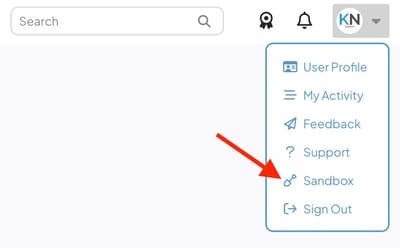
- If your organization has multiple Sandbox environments, hover over Sandbox and select the desired environment from the menu.
- If your organization has one Sandbox, there will be just one Sandbox option.
- The Sandbox environment will open in a new tab, and you will be automatically authenticated.
Important: Sandbox sign-in is based on matching usernames. If a user was created in Production after the most recent Sandbox refresh, they will not be able to sign in to Sandbox until either the next refresh occurs or a matching user account is manually created in Sandbox.
When does sandbox refresh?
Sandbox is a snapshot of your production instance at the time of the most recent release. This means that sandbox can quickly become outdated. Any new Items or configuration updates made in production since the most recent release will not appear in the sandbox environment until the sandbox is refreshed.
Sandbox is "refreshed" when KaiNexus has a release. At this time, all data in sandbox syncs with your production instance.
The primary sandbox environment (sandbox.kainexus.com) will always refresh each release. However, the three alternate sandboxes and the EU sandbox may not be refreshed each release, depending on the needs of our customers.
Even if a sandbox does not refresh, it will still receive the new features from the release.
Pro Tip: Check out the release notes posted to the KaiNexus Updates page to see which alternate sandboxes are refreshed each release.
Helpful Tips on Sandbox
- When working in Sandbox, a persistent banner appears across the top of the screen to remind you that you are not in production. This helps prevent accidental changes in the wrong environment.
- Sandbox sessions automatically time out after 5 minutes of inactivity.
- The Search Bar and any other Item search fields do not work in the sandbox environments. If you are looking for an Item, use the Item Filter to narrow down the list of your organization's Items until you find the one you're looking for.
- Sandbox does not send out any emails, including email notifications, digest, subscriptions, account, and password reset emails.
- Hourly jobs do not run in Sandbox, which can cause data that relies on automated updates or scheduled processes to become outdated. This includes Item status updates, Badge updates, Habit Score calculations, Recurring Item creation, notifications, Chart thumbnails, snapshot-based System Reports, and AI Search results and indexing.
- Sandbox may run a little slower than your production instance of KaiNexus.
- Impersonating users in Sandbox does not require re-authentication.
- Images that were added to your production instance of KaiNexus will not load in Sandbox. Only images you upload directly to sandbox will load.
- If you find a bug in Sandbox, it doesn't mean the bug is also in production. Check to make sure the bug appears in your production instance before reporting it.
- When you copy an Item's link in Sandbox using the copy icon next to the title, the link will take you to the Item in production. If you want to copy the link to the sandbox Item, copy the URL in your browser.