
The following people can edit any Card on a Board:
- The Board's Owner, if they have the "Board Creator" permission.
- The Board's Editors, if they have the "Board Creator" permission.
- Anyone with the "Board Manager" permission for the Board's Location.
People with the "Card Manager" permission can edit specific Cards on a Board depending on the Card's Location.
However, you can also grant individual users permission to edit a Card, which is what this support article will discuss.
/Ofie/Ofie%20Profile%20Pic.png?width=50&height=50&name=Ofie%20Profile%20Pic.png) Pro Tip: Learn how to adjust a Card's Location in the Edit a Card's Visibility support page.
Pro Tip: Learn how to adjust a Card's Location in the Edit a Card's Visibility support page.
People with the Card Manager permission in the Card's Location can edit it. If the Card has no Locations set, people with the Card Manager permission set to everywhere can edit it.
Who can update a Card's Editors?
To update a Card's Editors, you must have permission to edit its Board. Only the following people can do so:
- The Board's Editor(s), if they have the "Board Creator" permission.
- The Board's Owner, if they have the "Board Creator" permission.
- Anyone with the "Board Manager" permission for Boards in that Board's Location.
Update a Card's Editors
To update a Card's Editors, locate the Card with which you want to work, then:
- Click the ellipsis in the top right corner of the Card.

- Click Editors in the resulting drop-down menu and the Editors window will open.
In the Editors window:
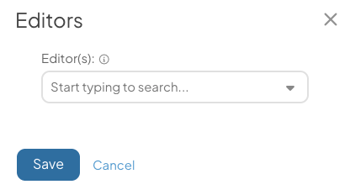
- Editor(s): Use this field to search for and select the people who should be given permission to edit this Card.

- The Card's Editors can, depending on the type of Card, edit the Card, change its View, change the sort order of Item Lists (including drag and drop), work with Bulk Change, view its Impact, and export it.
- If the Card is in a Stack, being an Editor of that Card does not grant permission to edit the Stack. The Editor will not be able to move the Card within the Stack.
- Select Save to apply your changes.