
Milestones let you track approval checkpoints as an Item moves through its lifecycle. From the Templates administration page, you can view the Milestones configured on a Template and update who's eligible to approve each one.
Who can edit a Template's Milestone Approvers?
Anyone with the Quality Admin permission can update a Milestone's Approvers.
Adding, removing, or otherwise configuring a Milestone—including its order, ready actions, deadlines, and more—can only be done by KaiNexus staff. Contact your Customer Success Manager for help with any of these.
How to edit a Template's Milestone Approvers
To update who can approve a Milestone for a Template:
- Navigate to the Templates administration page.
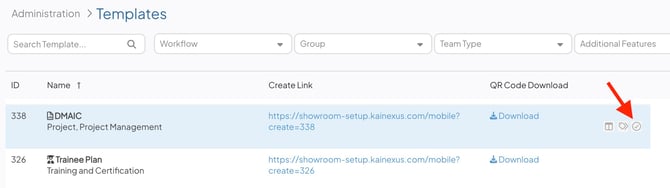
- Hover over the Template you want to work with, and select the checkmark icon.
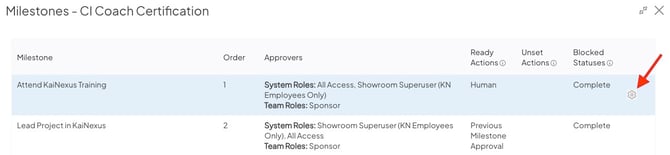
- The Milestone grid will open, showing every Milestone currently on the Template, including their order, approvers, ready actions, unset actions, and blocked Statuses.
- To update the approvers, hover over a Milestone, and select the gear icon. The Milestone Settings window will open.
In the Milestone Settings window:
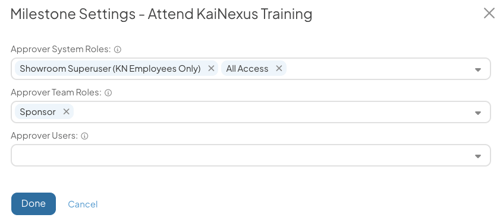
- Approver System Roles: Search for and select System Roles. A user with any of these System Roles will be able to approve this Milestone, assuming they have permission to view the Item.
- Approver Team Roles: Search for and select Team Roles. A user assigned to any of these Team Roles on the Item will be able to approve this Milestone. You can choose any Team Role, including Custom Team Roles, except Follower.
- Approver Users: Search for and select specific users. Anyone selected here will be able to approve this Milestone, assuming they have permission to view the Item.
- Select Done.
When you're finished editing, select Save in the Milestones grid. Remember to refresh your browser to see your updates applied.
/Ofie/Ofie%20Profile%20Pic.png?width=50&height=50&name=Ofie%20Profile%20Pic.png) Important: The three approver fields have an OR relationship, meaning a user only needs to meet one of the configured approver criteria to be eligible to approve the Milestone.
Important: The three approver fields have an OR relationship, meaning a user only needs to meet one of the configured approver criteria to be eligible to approve the Milestone.
Some approver settings can only be configured by KaiNexus staff and may further restrict who can approve a Milestone. These include:
- Defining eligible approvers using custom User Filter criteria.
- Requiring the Item to be within the approver's Location hierarchy.
- Requiring approvers to have Edit permission on the Item.
- Whether Milestone Assignment is enabled for the Milestone.
If a user appears to meet the configured approver criteria but is unable to approve the Milestone, submit a support ticket and we can help investigate.