
/Ofie/Ofie%20Profile%20Pic.png?width=50&height=50&name=Ofie%20Profile%20Pic.png) Important: The Advanced ROI Module must be turned on for your organization to utilize Investments.
Important: The Advanced ROI Module must be turned on for your organization to utilize Investments.
Investment Types are the customizable expenditures your organization tracks against its Impacts, such as Cost, Time, or Resources. Comparing Investments to the resulting Impact lets you measure Return on Investment (ROI).
Each Investment Type belongs to an Investment Category, which determines how it's grouped with other data in Reports.
Who can edit an Investment Type?
Anyone with the Quality Admin permission can edit an Investment Type's Name and Description. All other settings are visible for reference but cannot be changed.
Only KaiNexus staff can create and delete Investment Types. Contact your Customer Success Manager for help with any of these actions.
Edit an Investment Type
To edit an Investment Type:
- Navigate to the Investment Types administration page.
- Hover over the Investment Type you want to update, and select the pencil icon that appears to its right.
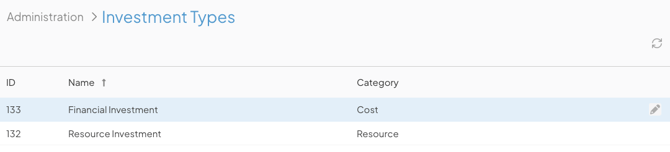
Pro Tip: The Investment Types listed on this admin page show which Category each one belongs to. You can also add the Templates column to the list to see which Templates each Investment Type has been added to.
Editable Fields
In the Edit Investment Type window, you can update:
- Name (required): The name used to identify this Investment Type.
- Description: Optional additional context for this Investment Type. This text is displayed on hover.
Select Save when you're finished.
View-Only Fields
The rest of the fields on this screen are shown for reference, but are disabled. They can only be changed by KaiNexus staff.
- Category (required): Defines how this Investment is grouped with other data in Reports. A category can't be changed once an Investment Type is created.
- Time, Resource, Cycle Time, Lead Time, and Takt Time Investments share their available Values with the matching Impact Category. For example, Time Investments and Time Savings Impacts share the same list of people.
- Impact Location: Links this Investment to specific Network Locations, which may differ from an Item's Originating or Responsible Location. Depending on how this is configured, users may be required, given the option, or unable to select a Location when logging this Investment.
If enabled, two additional settings appear:- The Impact Location within Responsible Location checkbox: When selected, users can no longer select any Location in the Investment Location field. Instead, they can only select Locations nested beneath the Item's Responsible Location.
- The User Select on Multiple Locations checkbox: By default, an Item's Location will auto-populate in the Investment Location field, and if an Item has multiple Locations (e.g., its Originating Location is different from its Responsible Location) the system picks one to auto-populate. However, if you select this checkbox, no Locations will auto-populate, forcing the user to select one.
- Amount Types: The available frequencies users can choose from when logging this Investment: One-Time, Recurring, Range, Custom, and/or Unknown.
- Default Amount Type: The Amount Type that's pre-selected when a user logs this Investment. This field is only available when Recurring is not selected as an Amount Type.
- Recurring Intervals: The available time intervals users can choose from when logging a recurring Investment (hourly, daily, weekly, monthly, or yearly).
- Default Recurring Interval: Determines which recurring interval is selected by default.
- Hide Unknown Person/Process (not available for Cost Investments): When enabled, removes the "Unknown Person/Process" option when logging this Investment, forcing users to select a specific person, resource, or process.
- Calculation Question: Determines whether the "How did you base the above calculation?" question is disabled, required, or optional when logging this Investment.
- Attributes: Any Impact Attribute(s) associated with this Investment Type, along with whether each is required or optional and single- or multi-select.