
You can configure a Template to require all directly nested children to be completed before the parent Item can be closed. This safeguard helps prevent projects from being marked complete too early and ensures that all nested work is properly finished before the Item moves forward.
This option is configured at the Template level, allowing you to enable it only for the Templates you choose.
/Ofie/Ofie%20Profile%20Pic.png?width=50&height=50&name=Ofie%20Profile%20Pic.png) Ready to get started? Contact your Customer Success Manager to add this feature to a Template.
Ready to get started? Contact your Customer Success Manager to add this feature to a Template.
How it works
On Items with Resolution
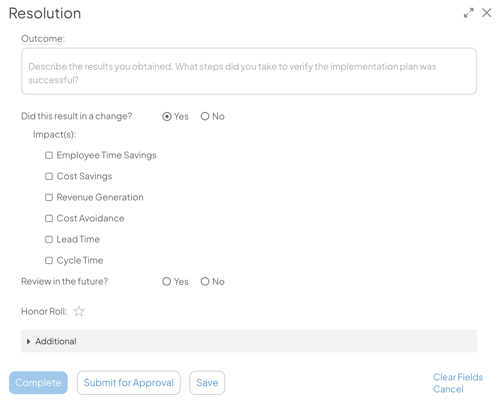
When Resolution is enabled on the parent Item, users may still enter Resolution information, but the Complete button will be grayed out until all child Items are completed.
On Items without Resolution
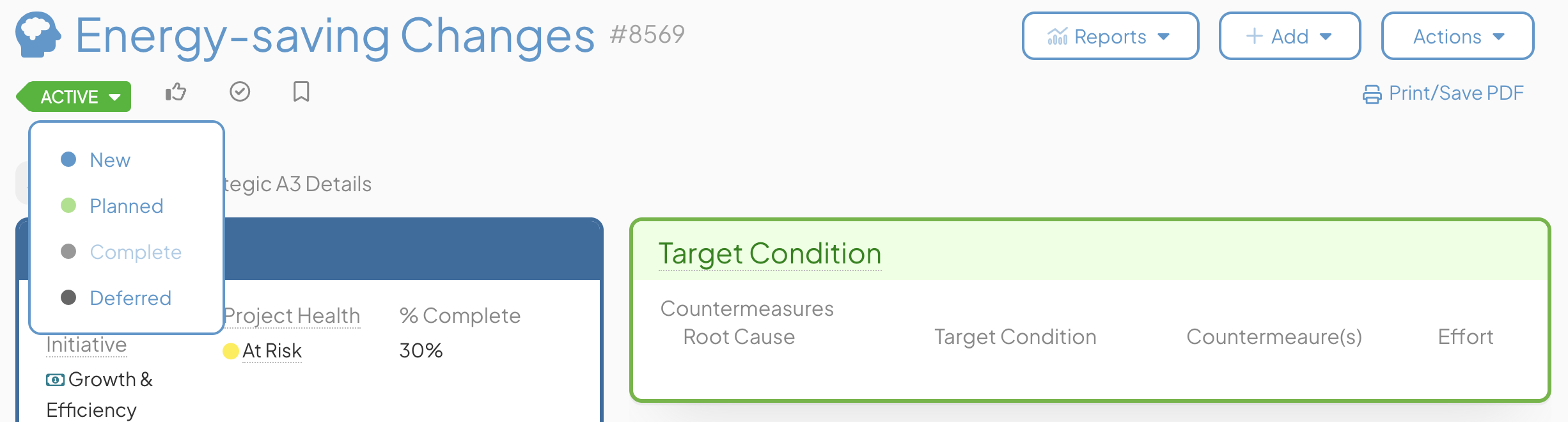
When Resolution is not enabled on the parent Item, the Complete option in the Item’s Status selector will be grayed out.
Limitations
-
Applies only to the first level of nested children; deeper levels are ignored.
-
If child Items are reopened or added after the parent is completed, the parent will remain closed.
-
Draft and Archived Items are ignored and do not block completion.
-
Items can still be completed using Bulk Change.