
/Ofie/Ofie%20Profile%20Pic.png?width=50&height=50&name=Ofie%20Profile%20Pic.png) Important: The actions described on this support page require the Assessments Module, which is currently in a closed Beta. Contact your Customer Success Manager for questions about the module.
Important: The actions described on this support page require the Assessments Module, which is currently in a closed Beta. Contact your Customer Success Manager for questions about the module.
This support page will cover:
- Who can archive and delete an Assessment's Fields and Sections?
- Archive a Field from an Assessment
- Archive a Section from an Assessment
- Delete a Field from an Assessment
- Delete a Section from an Assessment
Who can archive and delete an Assessment's Fields and Sections?
Anyone with the "Quality Admin" System Role Permissions can archive and delete an Assessment's Fields and Sections.
Archive a Field from an Assessment
To archive a field on an Assessment, navigate to the Assessments administration page, and select the name of the Assessment. This will open the Assessment's individual administration page, including all its current fields and sections. Then:
- Hover over the Assessment Field you'd like to archive. This will cause action icons to appear.
- Select the archive icon.
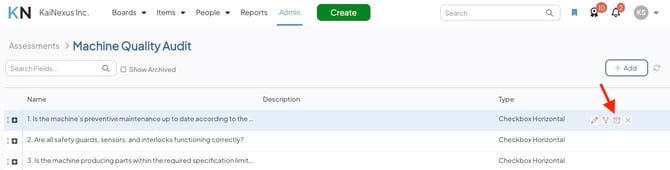
- Select Archive in the confirmation window.
After you archive an Assessment Field from an Assessment:
- It will no longer appear on new Items of that Assessment Type.
- The Assessment Field and populated value will still be present on existing Assessment Items.
- It will still appear as usual on any other Assessment Types it was also added to.
- You can see archived fields from this Assessment by selecting the Show Archived checkbox.
- You can unarchive the field to make it available on new Assessment Items again.
Archive a Section from an Assessment
To archive a Section on an Assessment, navigate to the Assessments administration page, and select the name of the Assessment. This will open the Assessment's individual administration page. Then:
- Hover over the Section you'd like to archive. This will cause action icons to appear.
- Select the archive icon.
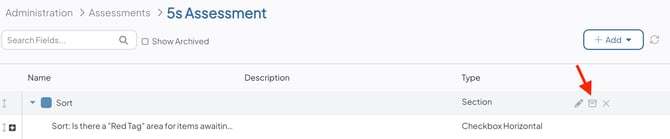
- Select Archive in the confirmation window.
After you archive a Section from an Assessment:
- It will no longer appear on new Items of that Assessment Type.
- Every Assessment Field nested inside the Section is archived along with it.
- The Section, and any of its Fields that still have populated values, will still be present on existing Assessment Items. Once every Field within an archived Section is saved without a value, the entire Section will disappear from that Item.
- You can see archived Sections from this Assessment by selecting the Show Archived checkbox.
- You can unarchive the Section to make it and its Fields appear on new Assessment Items again.
Delete a Field from an Assessment
Caution: Deleting a Field cannot be undone, and existing data for that Field's values will be lost.
To delete a field on an Assessment, navigate to the Assessments administration page, and select the name of the Assessment. This will open the Assessment's individual administration page. Then:
- Hover over the Assessment Field you'd like to delete. This will cause action icons to appear.
- Select the x icon.
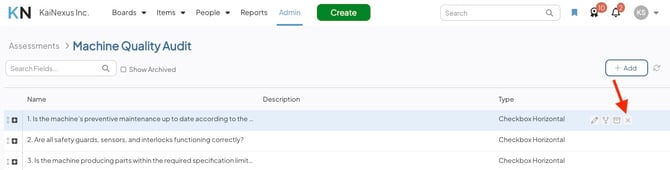
- Select Delete in the confirmation window.
After you delete a field from an Assessment:
- It will no longer appear on new Items of that Assessment Type.
- It will be removed from existing Items of that Assessment Type, and the data for the values on those Assessment Items will be lost.
- It will still appear as usual on any other Assessment Types it was added to.
Delete a Section from an Assessment
Caution: Deleting a Section cannot be undone.
To delete a Section on an Assessment, navigate to the Assessments administration page, and select the name of the Assessment. This will open the Assessment's individual administration page. Then:
- Hover over the Section you'd like to delete. This will cause action icons to appear.
- Select the x icon.
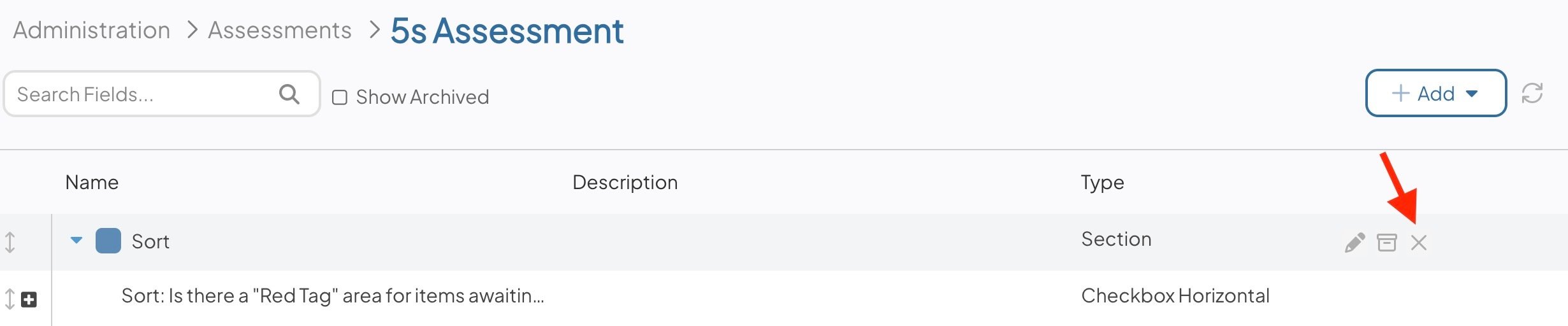
- Select Delete in the confirmation window.
After you delete a Section from an Assessment:
- It will no longer appear on new or existing Items of that Assessment Type.
- Any Assessment Fields that were nested inside the Section are not deleted. They're un-nested and remain on the Assessment as standalone Fields.