
/Ofie/Ofie%20Profile%20Pic.png?width=50&height=50&name=Ofie%20Profile%20Pic.png) Important: The actions described on this support page require your organization to have the Assessments Module, which is currently in a closed Beta. Contact your Customer Success Manager for questions about the module.
Important: The actions described on this support page require your organization to have the Assessments Module, which is currently in a closed Beta. Contact your Customer Success Manager for questions about the module.
If an Assessment is no longer needed, you can choose to archive or delete it.
- Who can delete and archive Assessments?
- Archive an Assessment
- Unarchive an Assessment
- Delete an Assessment
Who can delete and archive Assessments?
Anyone with the "Quality Admin" System Role Permission can archive and delete an Assessment.
Archive an Assessment
If you no longer want this Assessment to be performed on Items moving forward, but you do not want to permanently delete it from the platform, you should archive it.
To archive an Assessment:
- Navigate to the Assessments administration page in the Admin section.

- Hover over the Assessment you'd like to archive. Quick action icons will appear to the right.
- Select the archive icon.
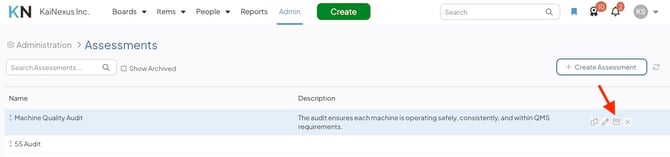
- Confirm your decision by selecting Archive in the Archive window.
After an Assessment is archived:
-
Existing Items will still display the completed Assessment in the Assessments Panel.
-
The archived Assessment will no longer be available when adding new Assessments.
-
To view archived Assessments, use the Show Archived checkbox.
Unarchive an Assessment
If you decide you want to use an archived Assessment once again, you can unarchive it.
To un-archive an Assessment:
- Navigate to the Assessments administration page in the Admin section.

- Select the Show Archived checkbox to include archived Assessments in the list.
- Hover over the Assessment you'd like to un-archive. Quick action icons will appear to the right.
- Select the archive icon.
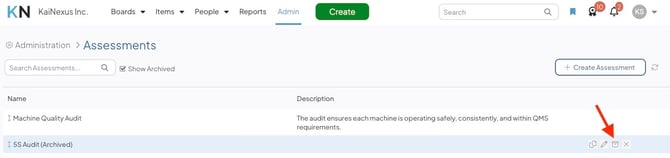
- Confirm your decision by selecting Unarchive in the Archive window.
Delete an Assessment
If you want to completely remove an Assessment from the platform you can delete it.
To delete an Assessment:
- Navigate to the Assessments administration page in the Admin section.

- Hover over the Assessment you'd like to archive. Quick action icons will appear to the right.
- Select the x icon.
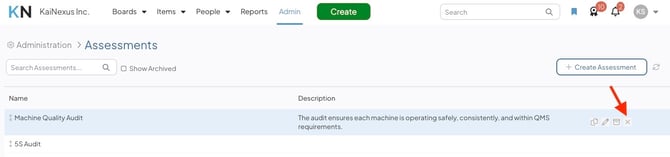
- Confirm your decision by selecting Delete in the Delete window.
After an Assessment is deleted:
- The corresponding Assessment Panel will be removed from existing Items.
- Any nested Assessment Items using this Assessment will persist.