
The Admin section is where you configure settings for your organization. Settings are grouped into collapsible sections, and a search bar lets you jump straight to a setting instead of browsing the full list.
Who can access the Admin section?
Anyone with one of the following System Role Permissions can access the Admin section:
- User Manager
- Quality Admin
- System Admin
- AI Admin
What you can see and change within the Admin section depends on your specific System Role Permissions. You may be able to access and view a page without having permission to make changes to it.
Searching for a setting
Use the search bar at the top of the Admin section to find a setting by name instead of scrolling through every section.
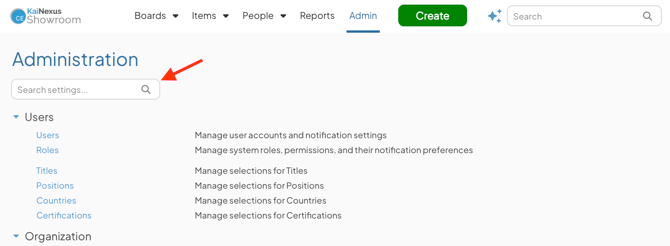
- Click the search bar at the top of the Admin section.
- Start typing the name of the setting you're looking for.
- Select a result to go directly to that setting's page.
As you type, KaiNexus filters the list down to matching settings only.
How settings are grouped
Settings are organized into the following sections:
- Users
- Organization
- Workflows & Templates
- Resolution
- Assessments (only visible if the Assessments module is enabled for your organization)
- System
Click a section header to expand or collapse it, and click the name of a setting to open its page.